
Purpose
This page explains how to name a developmental build — something that is essential for useful bug reports.
Applicability
This is applicable to developers and testers.
Written Description
We need to name builds in development in such a way that people can tell what is in the build.
The name is in the following format:
[Repository] “Build” [Date of last commit] [Branch] [Short ID of last commit]
Repository: the (short) name of the place where the project is stored in github. Examples: CCodeRepos, UFPS, JulianXPrize, CubeEngine
“Build“: the world ‘Build’ so that people know what this file is.
[We might optionally tag this with the platform — iOS Build, Android Build, Editor Build].
Date of last commit: what was the date of the last commit being built from? The date should be in YYYY-MM-DD format; thus, February 10, 2016 is 2016-02-10.
Branch: which branch of the project is being built from? Examples: FrankenApp, 53-Test, CK-CPTE, Purge
Short ID of last commit: What is the 7-digit SHA1 unique ID for the last commit you are building with? Note: ‘last commit’ refers to the last commit your project is synced to at building time; it isn’t necessarily the same as the last commit in github.
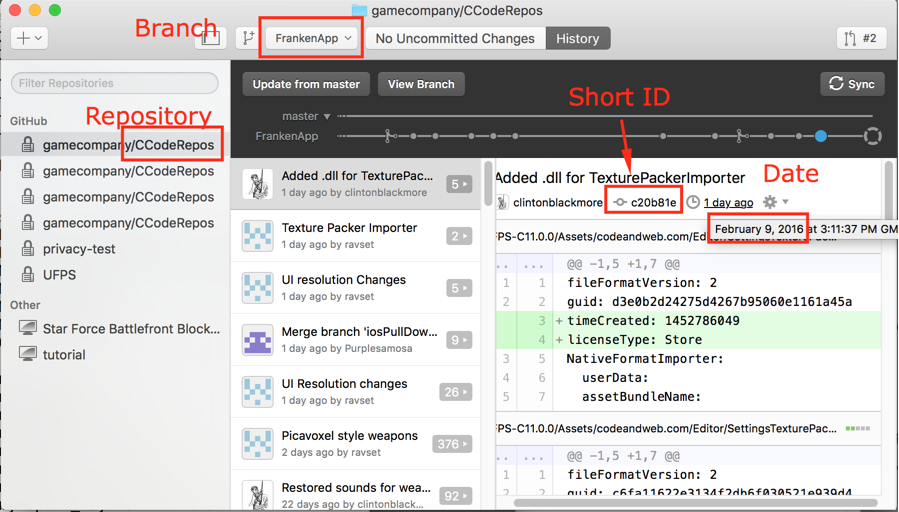
Finding This Information in GitHub Desktop
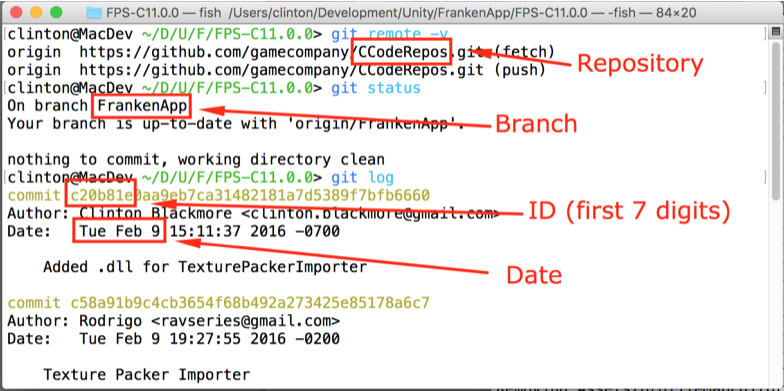
Finding This Information In A Git Shell
Putting It All Together
In both of the images above, the information is:
[Repository] “Build” [Date of last commit] [Branch] [Short ID of last commit]
Repository: CCodeRepos
Date of last commit: 2016-02-09
Branch: FrankenApp
Short ID of last commit: c20b81e
Plugging that into our format
[Repository] "Build" [Date of last commit] [Branch] [Short ID of last commit]
we get:
CCodeRepos Build 2016-02-09 FrankenApp c20b81e