
Purpose
This document speculates about how to update X-Code projects.
Instructions
You will, of course, need an X-Code project to update, and I assume you’ll be following most of the steps for doing a C16.2.2 update using the Enemy Exporter. You’ll also need to know which branch you are updating to — I’d go with C16.4 at the time of writing.
It is unclear to me how you’ll get all the new prefabs from an X-project game to the C-code. I’m sure Michelle has a good idea, and will ask her.
Level Prep
Before doing the export, you’ll want to prep your levels. A lot of them look beautiful because of a new shader, but it left scripts on the geometry objects (which aren’t needed any more) that will prevent the levels from exporting. Save yourself some effort; open each level and:
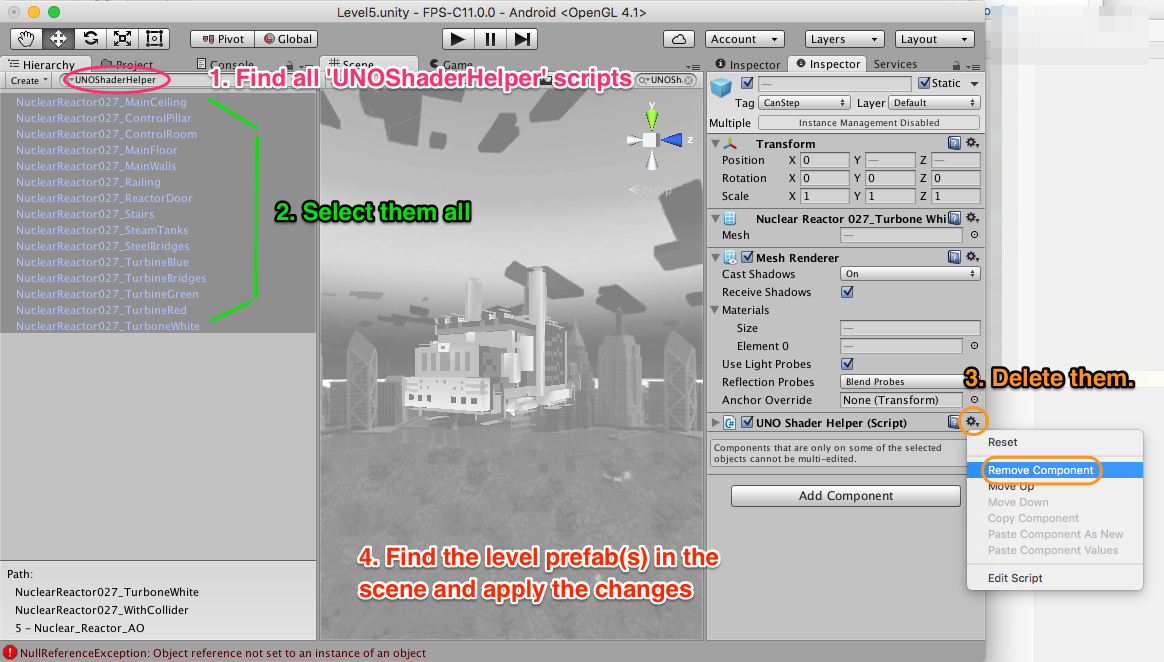
- Search the heirarchy for UNOShaderHelper. It’ll highlight all game objects that have this script on them.
- Select all the game objects with the script.
- Remove that component from all the objects.
- Then, exit your ‘find’, go to the geometry prefabs, and apply them — or, better, break the prefab connection. This’ll save them without the scripts so that they’ll export.