
This applies to the Hub project, which uses Voxel Engine.
Choosing A Shader
The shader to use for regular lighting is: VoxelEngine/Diffuse
If an object is a cutout (like the outline of a mushroom, or even a door with glass) use: VoxelEngine/Grass_cull_off
If the object is water, use: VoxelEngine/Water
If the object is semi-transparent, use: VoxelEngine/Alpha-Diffuse
– Note: this reduces performance and increases work. Use sparingly.
– (The above is true for regular rendering; in addition, the Voxel Engine looks at the shader used on a block. If the shader has ‘alpha’ in the name, it can not consider the blocks made out of it to be a solid mass and has to draw each face of each blocks. This is bad for memory, performance, and worse, we send more triangles than we are allowed to in a mesh, and Unity truncates it).
If the object is a custom mesh, then it appears we should use VoxelEngine/Object-Diffuse.
Lastly, there is VoxelEngine/Alpha-Diffuse_cull_off. I don’t really know when you’d use it. Perhaps if you had a transparent cutout.
Types Of Blocks
CubeBlocks
– default choice
– used for solid blocks
– surprisingly, used for tree leaves
– use the VoxelEngine/Diffuse shader
GroundBlocks
– used for terrain (grass, sand, etc)
– normal blocks cover a 1×1 area and then repeat
– these are designed to cover a 4×4 area, and then then repeat
* I hacked the code for our demo to disable this feature
– to make the texels as big as in regular blocks, use 4x the width and height in a texture
– use the VoxelEngine/Diffuse shader
FluidBlocks
– use for water (and probably lava)
– use the VoxelEngine/Water shader
CrossBlock
– user for flowers, plants, bushes, grass, fire
– I suggest using the VoxelEngine/Grass_cull_off shader
MeshBlock
– ???
GameObjectBlock
– allows us to use a custom game object
– use the VoxelEngine/Object-Diffuse on the object
DoorBlock
– if the door is solid, use the VoxelEngine/Diffuse shader
– if it has a cutout part, use VoxelEngine/Grass_cull_off
– if it needs transparency (tinted glass, perhaps), use VoxelEngine/Alpha-Diffuse
StairBlock, FenceBlock
– these are wrapped around shapes, and use a solid texture
– use the VoxelEngine/Diffuse shader
GroundBlocks Tile Size
Ground blocks have the ability to manage tiling differently
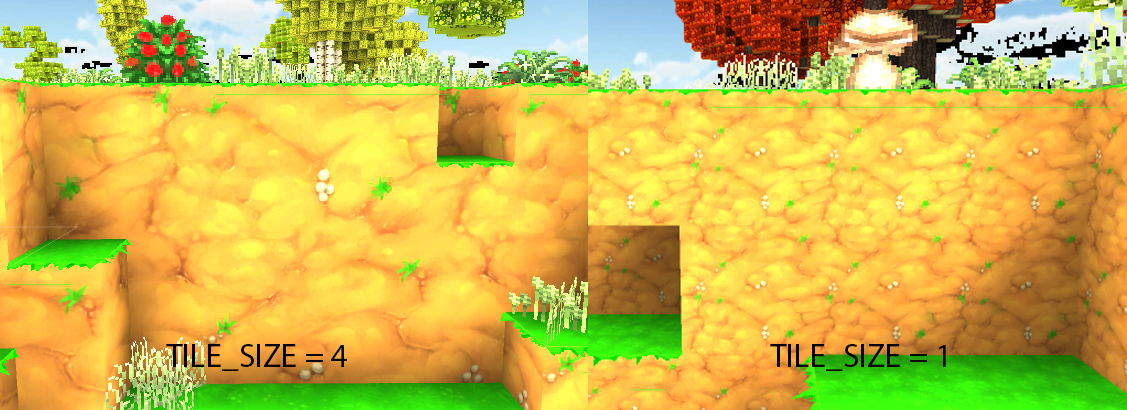
To accomplish this you need to edit “TILE_SIZE” option in the script “GroundBuilder.cs”

if you change the number if you can have a bigger/tilled top texture of the ground block, but you need to change the texture depending of the number you changed, in this example we used a Tile_size = 2;
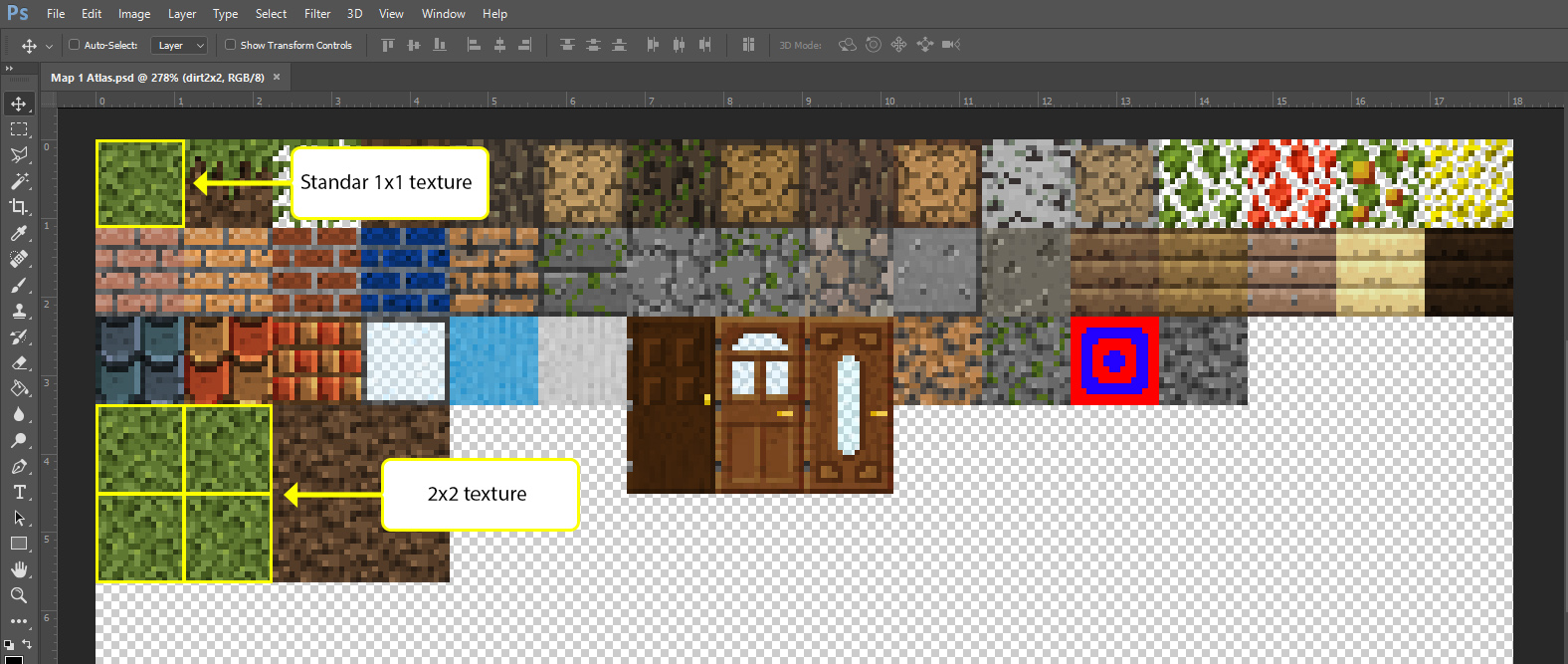
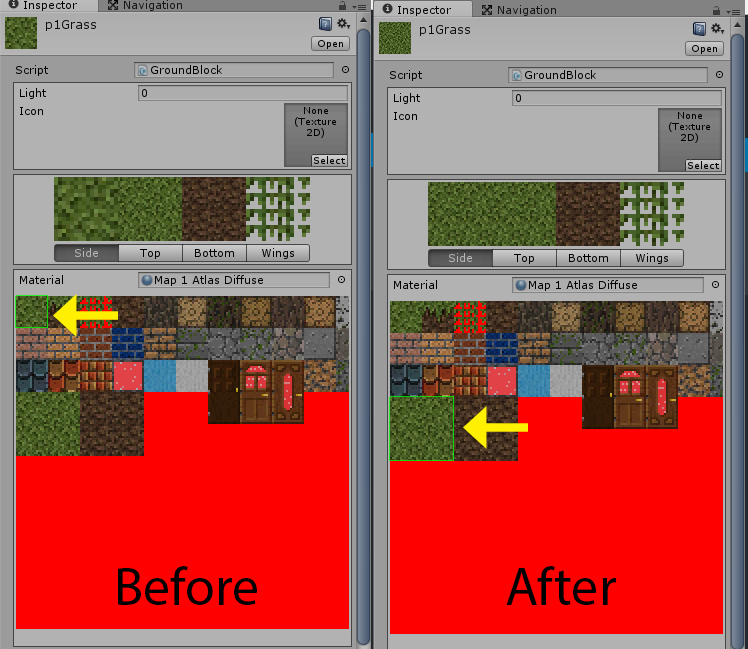
NOTE: if you want to ground blocks behave like other blocks use “TILE_SIZE = 1”
Here is how blocks are set up in the Voxel Engine.
They have a texture called ‘Base Atlas’
They have a material called ‘Base Atlas’ (using the ‘Base Atlas’ texture)
– this material uses the VoxelEngine/Diffuse shader
Texture: Base Atlas (512×512)
+ Material: Base Atlas; Shader: VoxelEngine/Diffuse
+ Used by most of the ‘3 Artifact’ blocks (mostly CubeBlocks, but also Fence, Stair, and MeshBlocks)
– Brick, Chest, Fence, Fireplace, MeshBlock, Pumpkin, Stair Block, TNT
+ Used by half of the ‘4 Tree/Wood’ blocks (CubeBlocks)
+ Used by the ‘Old Terrain’ blocks (CubeBlocks)
+ Material: Base Atlas-Alpha; Shader: VoxelEngine/Alpha-Diffuse
+ Used by ‘2 Flora\Cactus’ (a CactusBlock)
+ Used by some ‘3 Artifact’ items
– Door (DoorBlock), Fire (CrossBlock)
+ Used by half of the ‘2 Flora’ blocks (all CrossBlocks)
+ Material: Grass; Shader: VoxelEngine/Grass_cull_off
+ Used by half of the ‘2 Flora’ blocks (all CrossBlocks)
There are additional grass textures (512×512) but no corresponding materials
– Fern, Grass &2, Weed &2&3, WhiteFlowers
Texture: Terrain Atlas (4096×256)
– includes textures for Dirt, Grass, Leaves &1&2&3, Sand, Stone, Wood (most are 256×256)
+ Material: Terrain Atlas; Shader: VoxelEngine: Diffuse
+ Used by all ‘1 Terrain’ blocks (except Water); these are all GroundBlocks
Texture: Leaves 2
+ Material: Leaves 2; Shader: VoxelEngine/Alpha-Diffuse_cull_off
Texture: Tree Atlas (1024×128)
– has textures for leaves and logs
+ Material: Tree Atlas; Shader: VoxelEngine: Diffuse
+ Used by all ‘4 Tree/Leaves’ blocks (CubeBlocks)
+ Used by half of the ‘4 Tree/Wood’ blocks (CubeBlocks)
Texture: Water (32×32)
+ Material: Water; Shader: VoxelEngine/Water
+ Used by ‘1 Terrain/Water’ block; set to a FluidBlock