
Understanding What The Exporter Does
This page is optional, but I advise looking at the ‘Notes’ section.
It may be useful to understand what the exporter does.
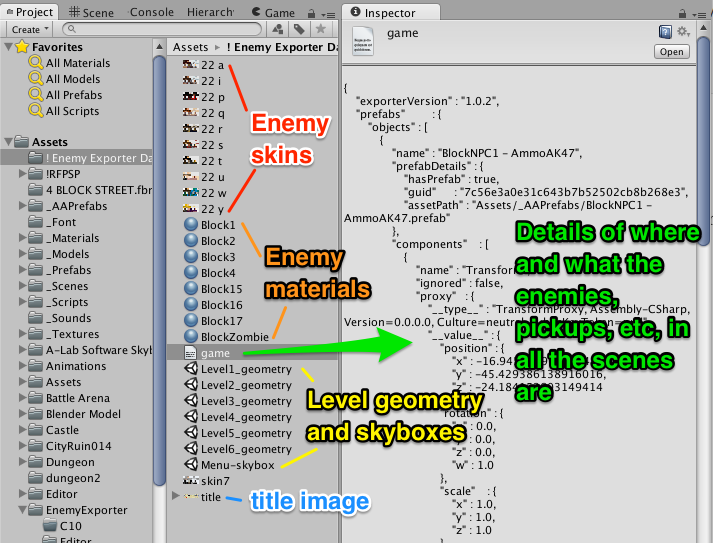 When exporting, it:
- Saves the bundle ID, company name, etc
- Loads the menu scene, grabs the title image, deletes everything else, and saves it as ‘Menu-Skybox’
- Goes through each level:
- Exports all of the enemies, with their settings
- Exports the player start point and pickups (without any settings)
- Gets rid of everything in the scene that has a script on it and saves the scene as ‘LevelX-Geometry’
- Collects a list of all enemy prefabs used in all the levels and saves their settings
- Saves copies the enemy skins and materials
What does the importer do?
- It sets the company name, and the bundle ID (and even bumps it up for you)
- It applies the changes to the enemy prefabs
- It takes the menu skybox, adds in the C16 menu stuff, and saves it over the existing menu scene
- For each level:
- it takes the LevelX-Geometry file
- it adds in all the new C16 stuff that should be in every level
- it imports all the enemies with their settings
- it places the player start point and pickups
Notes
- When something is exported (like, say, a pickup, or even an enemy), the exporter remembers the unique ID of the prefab used for that game object. When it imports it, it instantiates the latest version of the prefab.
- the enemies placed in the scene will be C16-style enemies. (The exporter has special code to update the saved data for the enemies from C10-style to C16-style).
- the player starting point and pickups will all use the latest versions and artwork in the branch that you started from.
- You may want to go through your levels beforehand and make sure that the buildings and other level-geometry items do not have any scripts on them. You may need to break prefab references. (Look at the troubleshooting steps for the levels for more details).
- Things that use scripts in your scenes (like elevators and particle effects) will not come over during the import. You’ll need to re-add them manually.
- The game’s icon isn’t exported, but that is just as well as you’ll want to get the latest version available for the game (as explained in a later step).
- Spiderbots aren’t likely to export at the moment.
- The exporter should work as-is for C10 and E versions of the game, and should work for games generated from C16.2.2 or newer. It will need tweaking to work with earlier C16 games.