
Branch Of Off Latest Version
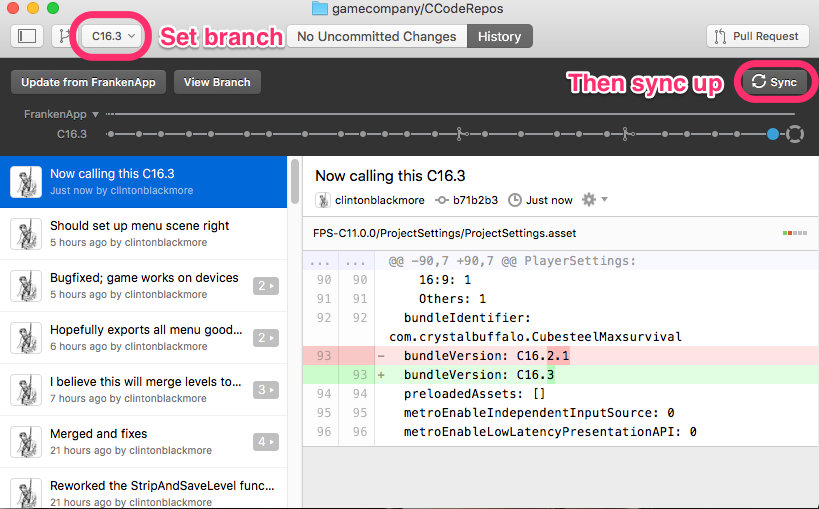
Open GitHub Desktop, and switch to the branch that has the features you are updating to. At the time of writing, you’d want the “C16.2.2” branch [it was called the C16.3 branch when we took the screenshots] but your task instructions should tell you which branch to use. If you aren’t certain, ask. Switch to it and sync up to the latest version of the branch.
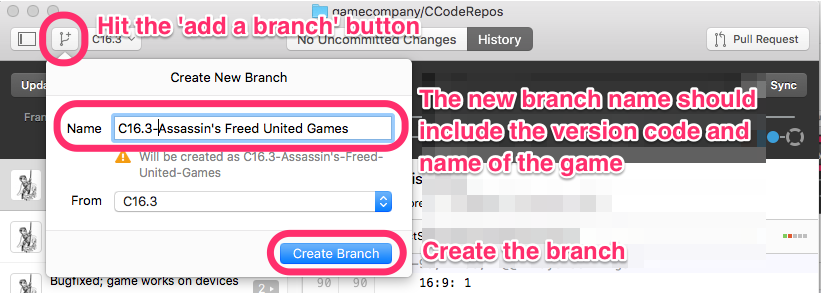
Now, create a branch based on your game name. I’m going to create a branch called “C16.2.2-Assassin’s Freed United Games”. (Note that GitHub Desktop changes the name slightly).
Note: it is a good practice to try to build the game for your device from version control before going to the work of updating it BUT this we cleared out the Unity Services setting in this project and it will give you errors related to advertising and analytics until you set up Unity Services in a later step.