
Changes In Each Level
You need to make some tweaks to all the levels.
Set the Aiming Snap
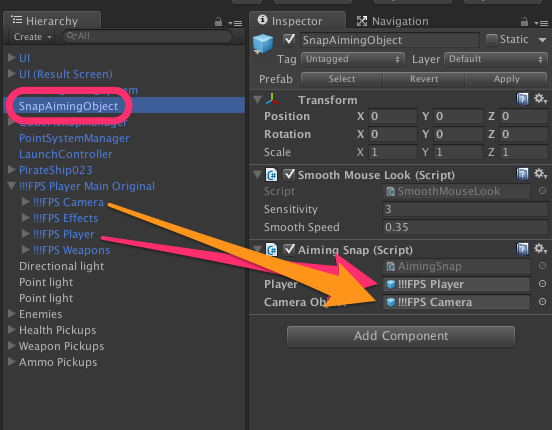
In the scene, find the ‘!!!FPS Player Main Original’ object, and open the disclosure triangle beside it, and then find and select the ‘SnapAimingObject’.
Fill in the ‘Player’ field of the snap aiming object with the ‘!!!FPS Player’ game object, and fill in the ‘Camera Object’ field with the ‘!!!FPS Camera’ object.
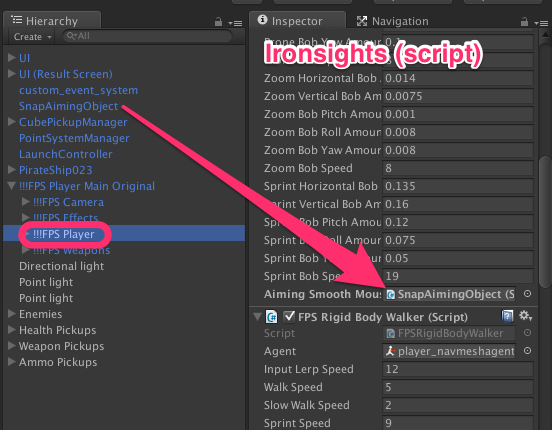
Secondly, you need to do roughly the reverse. Select the FPS Player object, and scroll down to the end of the ‘Ironsights’ script. There is a field that needs the ‘SnapAimingObject’, so drag it in.
Rebuild The Nav Mesh
The C16 enemies use a navigational mesh (or ‘navmesh’) to get around the level. If you don’t have a navmesh, they don’t move 🙂
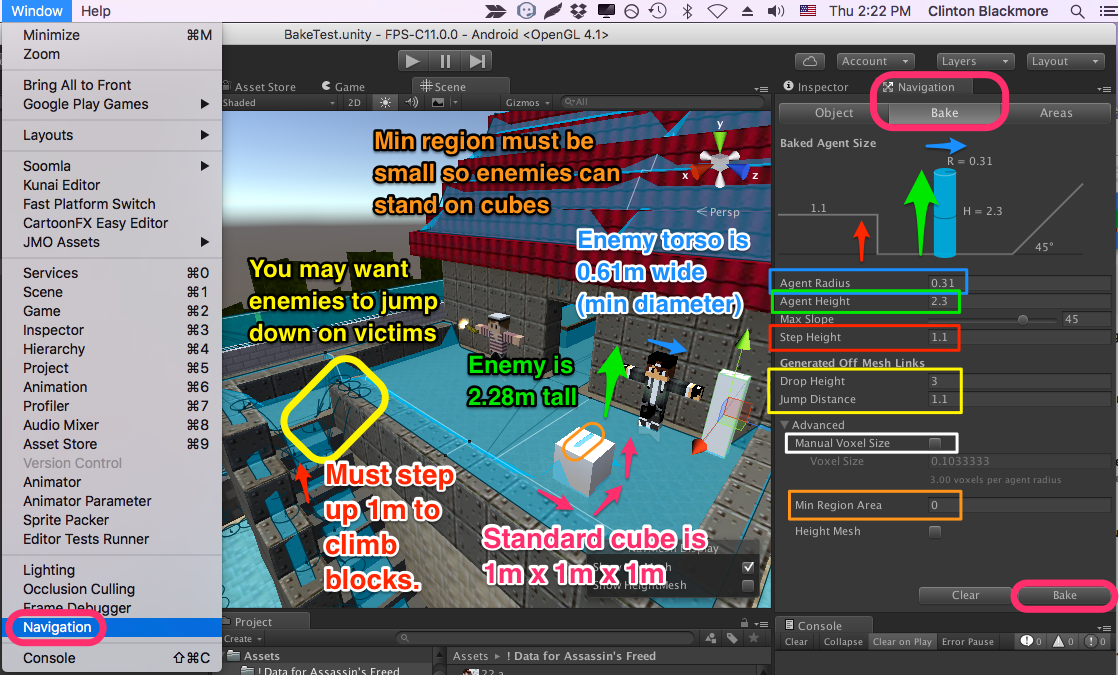
Choose Window -> Navigation. On the ‘Navigation’ panel, click on ‘Bake’ tab. Enter in the settings below (and tweak to taste — see the notes to follow), and hit the ‘Bake’ button.
Sizes used in the Nav Mesh (and why):
Agent Radius: 0.31; the enemy is 0.61m wide, this is half of that. It may cause enemies arms to clip through geometry. Do not set this value larger than 0.49, or enemies will not be able to get up onto single cubes in the level.
Agent Height: 2.3; the enemy is 2.28m tall, and we don’t want the head clipping. (If your game has doors that are 2 blocks tall and you need enemies to get through, set this value to 1.9).
Max Slope: just left it at the default of 45 degrees; there aren’t many slopes in our game.
Step Height: 1.1. If this is less than 1, the enemy can not climb up the height of a single cube.
Drop Height: This is how far an enemy will jump down. Go ahead and play with it to be appropriate for your game.
Jump Distance: An enemy can jump over space this far. Go ahead and play with it.
(See the area circles in yellow for what dropping and jumping areas look like in when the nav mesh is visible).
Do uncheck ‘Manual Voxel Size‘. Set the Minimum Region to 0 (or maybe 0.1); this allows a tiny walking space (such as on top of a single cube) to be valid so that an enemy can stand on it.
Troubleshooting: Still No Navmesh
If you followed those steps and didn’t get a navmesh, or didn’t get a proper navmesh, then you almost certainly don’t have the level geometry set to ‘static’. Please see the first three minutes of this video: (Note that the rest of the video does not apply to this project).
https://www.youtube.com/watch?v=oc1uxYiPoTA