
AdColony Setup
As the process for AdColony setup is well documents, I’m just going to go over the most important parts and refer you to other documents to fill in the gaps. (If this isn’t helpful, let me know and I’ll modify these instructions).
The primary documents with step-by-step details are:
- The AdColony steps of the Ad Cascade setup doc. (“Ad Cascade steps”).
- You might also look at the filtering instructions in the Ad Networks Master Spreadsheet, on the “AdsFiltering” sheet.
- The AdMob + AdColony setup steps from AdMob are also good.
Here are the key points:
Log in to AdColony using adnetworks@blockyverse.com.
Find or create your game in AdColony. (See Ad Cascade setup, steps 1-5).
I recommend that you set up new placements, and call them “Rewarded Via AdMob” and “Interstitial Via AdMob” (assuming you need both rewarded ad and interstitial ad placements.) It is a good practice to set them up in Test mode for now, and come back later and put them into Live mode. Create the placements as in AdColony Ad Cascade, step 5.5. (Look for ‘You need to add placements’).
Now, you need to obtain the following information:
AdColony
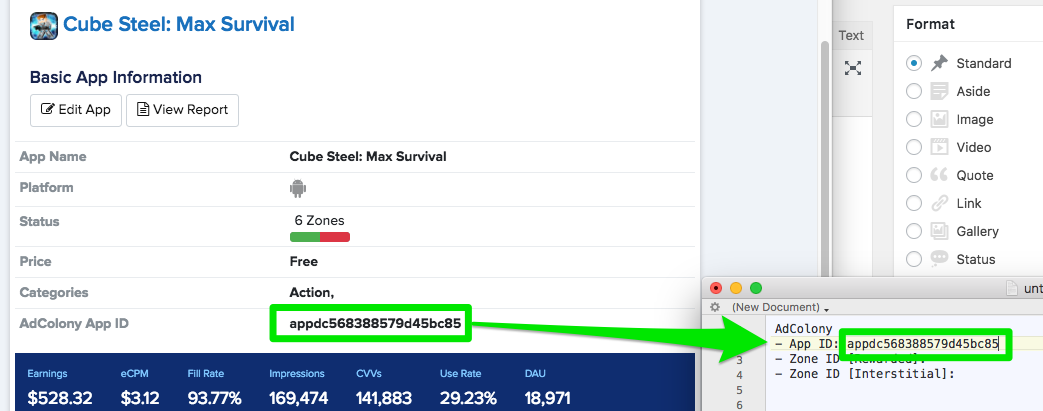
- App ID:
- Zone ID [Interstitial]:
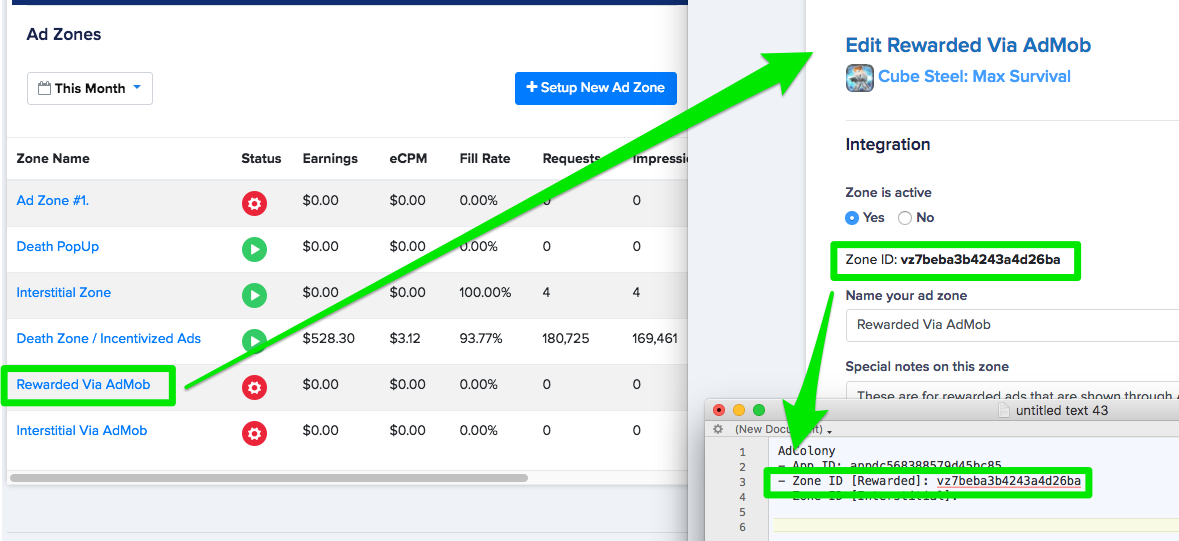
- Zone ID [Rewarded]:
You can get the App ID from the basic information page:
And then, for all the placements you are interested in, scroll to the bottom of the page, click on the placement, and copy the Zone ID into your notes.
That’s it for now. Keep the information handy for later.