
Purpose
This article explains the basics of creating missions.
Applicability
This article is applicable to Game Designers using the D5.1+ code.
Video
The video is uploading but it looks like it won’t be up for a couple of hours. In the interim, look at the video on Dynamic Variables in Action, remember previous training you’ve had on the missions, and play with them to see if you can accomplish anything.
https://youtu.be/_OzqnxtXZgU
Notes
I recommend planning out the different sorts of missions you want to use and placing all four missions that will go in a scene at the same time.
Mission Icons are in Resources/Sprites/Missions.
Not Mentioned In Video
Players are rewarded for completing a mission quickly and with a certain amount of health. You need to set the time it should take to complete the mission, and how much health they should end with to receive a checkmark.
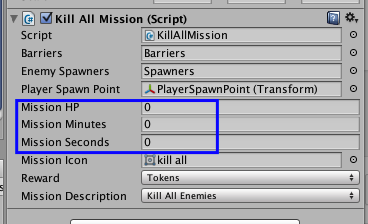
If you figure a player should need 45% of their health to be rewarded, set Mission HP to 45.
If you figure a mission should take 3 minutes 27 seconds to beat, set Mission Minutes to 3 and Mission Seconds to 27.
See Also
- Baking The Nav Meshes
- Using Relocation Points
- Posts on specific missions
[To do — add links here.]